
Agreement Payments & Forfeits
Track what a visiting school owes for a game, invoice and collect it, hand the bill to a finance office, and record forfeits.
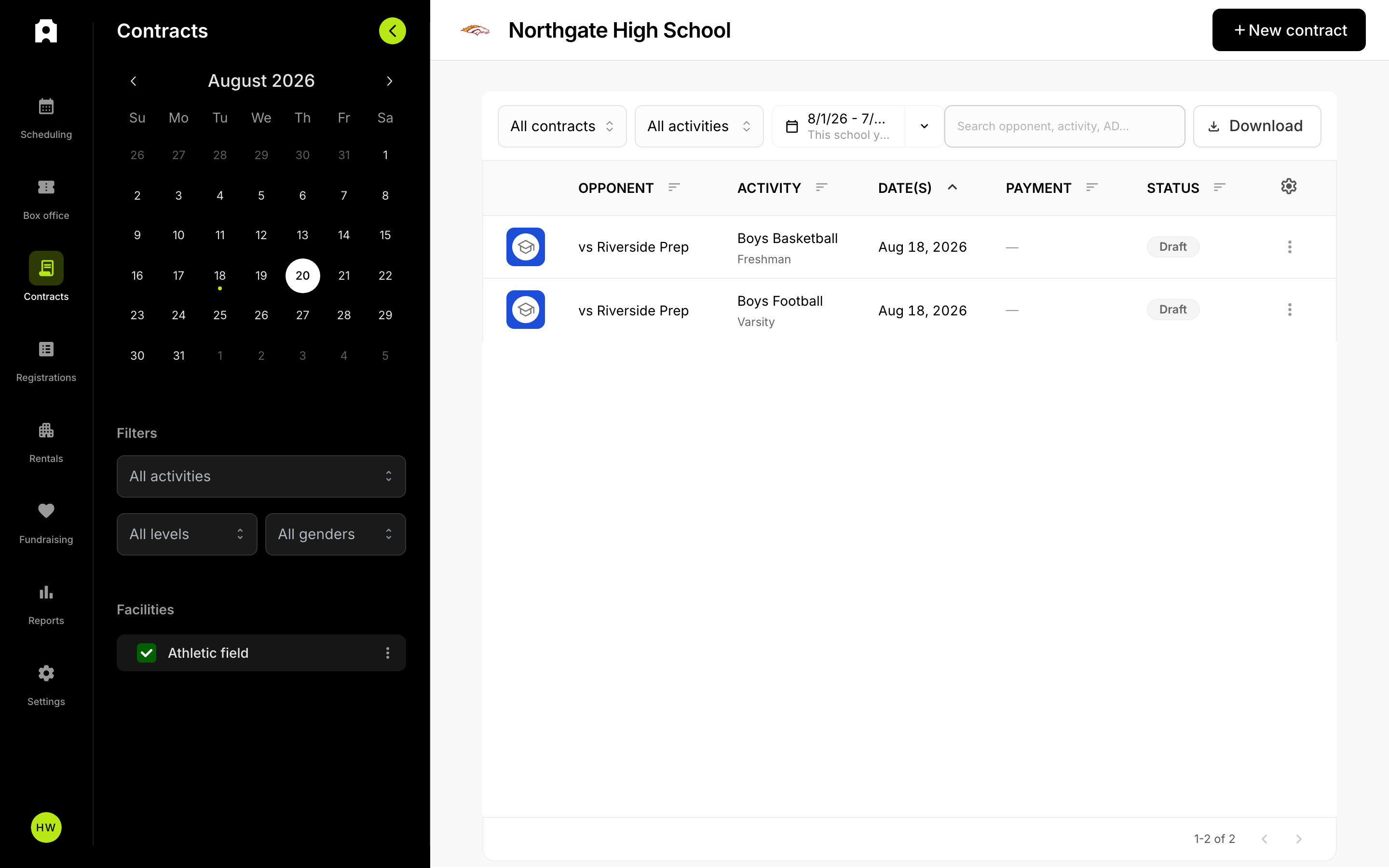 Proposal statuses and payments in the Proposals table.
After this article you will be able to see exactly what a visiting school owes you for a game, send them an invoice, collect or record the payment, pass the bill to their business office, and record a forfeit if the game never happens. This is the part of the process that starts once an agreement is signed — before that, nothing is owed.
A few words you will see along the way:
- A proposal is the offer you send another school: one or more games, with dates, sites and fees.
- An agreement is that proposal once both sides have signed it.
- An event fee is the money the visiting school pays you for playing at your site.
Who owes what
Every game on a proposal carries an event fee, which you set game by game while you build the proposal. The visiting school owes that amount to you, the host.
When the agreement is signed, Admittee adds up the fees for only the games the other school accepted and stores that total as the amount owed on the proposal. Games they declined are left out of the total.
A forfeiture fee is also filled in for each game ahead of time. By default it is whichever is larger: half the event fee, or $100. Nobody is charged this unless a game is actually forfeited.
What if the visiting school declined some of the games?
Only accepted games count toward the balance. If you proposed four games and they accepted two, the amount owed covers those two fees. You do not have to remove the declined games yourself.
What if the proposal has no fees at all?
Proposals where every fee is zero are marked not required. They never enter the payment workflow, so you will not see a balance, an invoice or a due date on them. The agreement still stands as a schedule commitment.
Payment status
Once an agreement is signed and there is a balance, you will see one of these payment statuses on the proposal:
- Owed — signed, there is a fee, and it is not due yet. The standard terms are 14 days from the day it was signed.
- Overdue — the due date has passed and the balance is still unpaid.
- With finance — you have handed the balance to a business office and are waiting on them.
- Paid — the payment came through by card, or you recorded it yourself.
- Waived — you decided not to collect the balance.
Each proposal gets its own invoice number, such as CTR-0042. That number appears on the invoice PDF and on the receipt, which makes it easier for a business office to match your bill to their records.
How the visiting school pays you
The other school can pay by card from the proposal page itself, or from a secure pay link you send them. No account or setup is needed on their side to use the link.
Sending the bill to a finance contact
Athletic directors often do not cut the checks. If the visiting AD tells you to bill their business office, you can send the invoice to that person directly, even though they have no Admittee account.
- Open the proposal from your Proposals table.
- Choose the option to send it to a finance contact.
- Enter the contact's name and email address.
- Send it. Admittee emails that person a secure pay link for this proposal only.
You can resend the email if it gets lost, or cancel the delegation if the contact changes. Sending it to a finance contact does not take the payment away from the AD — the Pay button stays on the proposal, so whoever gets to it first can pay.
If you want the proposal itself to show that the bill is sitting with a business office, use Send to finance. That puts the balance in the With finance status. You can recall it later to move the balance back to waiting on payment.
What if the finance contact loses the pay link?
Resend it. Resending issues a fresh link, and the old one stops working. That is deliberate: it keeps a forwarded or stale link from being used later. Tell the contact to use the newest email.
Recording a payment you received another way
Plenty of schools pay by check, district transfer or cash. Record those yourself so your records and theirs agree.
- Open the proposal.
- Choose to mark it paid.
- Enter the amount and the date you received it.
- Choose the method, such as check or transfer.
- Add a reference if you have one, like a check number or PO number. This is optional but makes reconciling much easier later.
- Save. The status changes to Paid and Admittee sends the payment-received email.
What happens if the due date passes and no one has paid?
The proposal shows as Overdue so you can spot it in the Proposals table. Admittee does not cancel the agreement, cancel the games, or charge anything extra for being late. Follow up with the school, or send the invoice to their finance contact.
Recording a forfeit
A forfeit is when a scheduled game does not get played because one of the two schools does not play it — they cannot field a team, they do not show, or they pull out. Record it on the proposal so the fee is handled correctly and your history is accurate.
- Open the proposal and find the game that was not played.
- Mark that game forfeited.
- Choose which side forfeited. The visiting school is selected by default; switch it to the host if your own school forfeited.
- Decide whether to charge the forfeit fee or waive it. Waiving is common for illness, a program that folded mid-season, or simple goodwill.
- Add a note if it helps. The note appears under the forfeited game for anyone reading the agreement later.
- Save.
Can I change a forfeit after I record it?
Yes. You can undo the forfeit, which returns the game to confirmed, and you can switch the fee between charged and waived afterward without starting over. Use undo if you recorded the forfeit on the wrong game or the game ends up being played after all.
What if a game is cancelled instead of forfeited?
A cancellation is for a game nobody is at fault for — weather, a facility problem, or a schedule conflict both sides agree to drop. A cancelled game owes nothing from either side, and no forfeit fee applies.
A game cannot be both cancelled and forfeited. Pick the one that matches what happened: forfeit when one school is responsible and a fee may be due, cancellation when it is nobody's fault.
What if I just want to write off the balance?
Waive it. The proposal moves to the Waived status, which records that you chose not to collect rather than leaving an unpaid balance sitting open. The agreement and the games stay exactly as they are.