
Setting Account Defaults
Set prices, rates and agreement text once in Settings so Admittee fills them in on everything you create next.
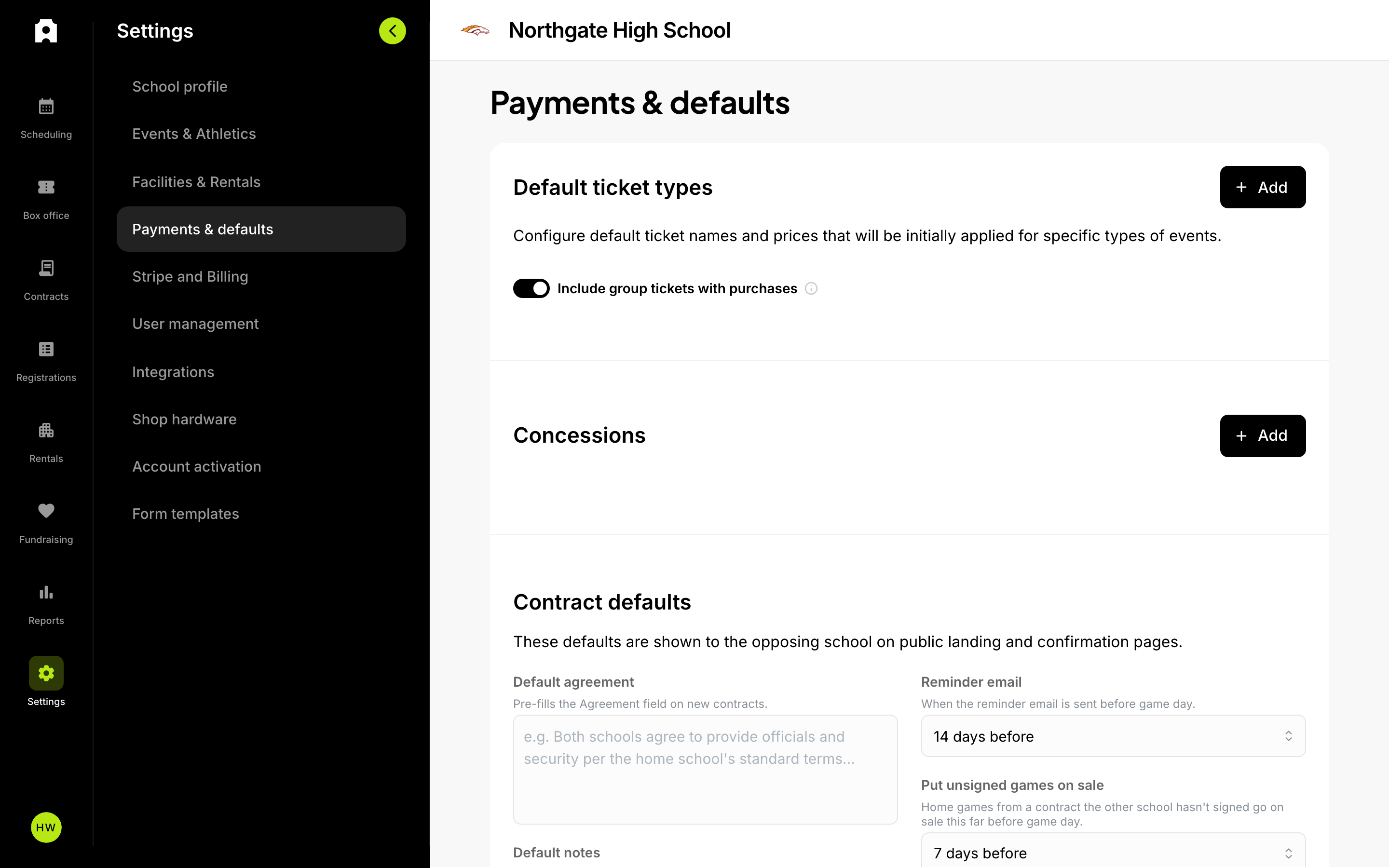 Default ticket types, concessions, and contract defaults live under Settings, then Payments & defaults.
If you find yourself typing the same ticket prices, rental rates, or agreement text every time you create something, account defaults will save you that work. Set a value once in Settings, and Admittee fills it in for you on every new event, contract, and booking after that. This is worth doing before a busy season starts, or right after you set up your account.
A default is simply a value Admittee copies onto a new record for you. It is a starting point, not a rule — you can change it on any individual event without changing the account-wide setting.
How to change a default
All defaults live on the Settings page, organized into tabs listed down the left side.
- Open Settings from the left sidebar, or from your avatar menu in the top corner.
- Choose a tab from the list on the left. Each tab groups a related set of defaults.
- Make your changes on the card you want to edit.
- Use the save button at the top of that card. Each card saves on its own, so if you changed two cards, save each one.
What lives on each tab
- Your organization profile (the tab is labeled with your organization type, for example "School profile") — your logo and brand colors, links to your public pages, organization details, and your school year.
- Events & Athletics — event categories, teams (your opponents), sports levels, seasons, and event sponsors.
- Facilities & Rentals — your facilities, default rental rates, your rental agreement, and seating charts.
- Payments & defaults — default ticket types, group-ticket behavior, concession items, contract defaults (default agreement text, notes, and reminder timing), buyer verification requirements, who pays service fees, and the email address that receives facility issue reports.
- Stripe and Billing — your payout account, tax documents, and your plan and fees.
How do you set default ticket prices?
A default ticket type is a ticket name and price — "Adult, $8" — that Admittee copies onto new events for you.
You set these up as rules under Payments & defaults. Each rule holds one or more ticket types, and you choose which events it applies to by picking event categories, competition levels, and genders. For example, you might make one rule for varsity football at $8 and $5, and a separate rule for all middle school games at $3.
A rule with no categories, levels, or genders selected applies broadly, as a catch-all.
Which default ticket rule wins when two of them fit?
Admittee uses the rule that matches your event most closely. A rule that matches more of your event's details — category and level and gender — beats a looser rule that only matches the category. The winning rule's ticket names and prices are copied onto the new event, and you can edit them there.
What if your default prices don't appear on a new event?
Default ticket types are matched on an event's category, level, and gender, which means they only apply to records that have those details. Fundraisers and non-ticketed events do not pick up game-gate pricing — a fundraiser in your Athletics category would otherwise inherit basketball prices for a banquet, so Admittee skips it and starts those records fresh.
If you expected prices on a regular event and nothing appeared, check that the event has a category assigned and that one of your rules covers that category.
Registration forms are a partial case: they pick up a default rule that matches on category alone. A rule that also specifies levels or genders will not apply to a registration.
What else gets copied onto new events?
Along with ticket types, new events and passes pick up:
- Your sponsor logos from Events & Athletics.
- Your round-up preference (whether buyers are offered the option to round their total up).
- Your group-ticket preference for the event's category.
- Who pays service fees, from your payments settings.
Round-up starts off on registrations regardless of your account preference. You can turn it on for an individual registration in the editor's More options.
What happens to your ticket types if you turn on a seating chart?
When you turn on a seating chart for an event, Admittee creates ticket types from the chart's seat labels so buyers can actually pick a seat. That replaces whatever ticket types were on the event.
Admittee only does this when you have not done any seating work yet. An untouched default ticket type counts as "no work yet," so your copied defaults can be replaced. As soon as you rename a default, add your own ticket type, or assign seats to a type, that work is protected and the chart will not overwrite it.
Why does Admittee suggest times when you add an event to a contract?
When you add an event to a contract, Admittee fills in a start and end time based on the competition level, so you are not setting times from scratch for a full schedule:
- Freshman and sophomore levels: 4:00 p.m. to 5:30 p.m.
- Junior varsity: 5:30 p.m. to 7:00 p.m.
- Varsity: 7:00 p.m. to 8:30 p.m.
Anything else gets 4:00 p.m. to 5:30 p.m. Each window is 90 minutes.
If you set the times yourself, changing the level afterward will not overwrite them. Admittee only replaces times it recognizes as its own suggestion.
Do defaults change records you already created?
No. Defaults are applied when a record is created, so changing a default today does not update events, contracts, or bookings you made earlier. Likewise, overriding a value on one event does not change the account-wide default. If you need to update existing events, edit them individually.
Who can edit these settings?
Not every tab is open to every role. Your payout account, your plan, and account-level changes are limited to admins, and other tabs check their own permissions — so a teammate may see a smaller list of tabs than you do. If a tab you expect is missing, ask whoever manages your account's users about your role.
What could not be confirmed
The grounding available does not confirm the exact on-screen labels and layout of every Settings tab, or the precise role required for each individual tab. Check the Settings page in your own account for the labels you see.